With as many things as we have to do every day, it’s easy to stop paying attention to how we’re interacting with our brand’s social media profiles. Learn about the many TV ad tracking methods. With an added demand for making our Tweets, posts, and status updates count for something, it can be tempting to try to fortify our marketing efforts with techniques we think will get our content seen by more people. However, this simply isn’t the case.
The following list details several (unfortunately common) social media mistakes that make users and brands look like they’re not sure what they’re doing. And when you’re trying to be an expert in your industry, that’s not a good thing!
#1: Liking Your Own Facebook Statuses
Forewarning: this is my biggest social media pet peeve.
You may think you’re the most hilarious person in the world and that your Facebook statuses are works of genius, but liking your own status screams that you’re desperate. This is especially true when brand pages like their own content. The problem with this mistake is that your “like” is inherent in your post or share—if you didn’t like the thing you posted, why would you share it in the first place?
With Edgerank, it might seem tempting to like your status so that more people can see it—Facebook adds extra stories about content that your friends and connections have liked or shared on their own timelines. But when you’re a brand page, the content you’re sharing is already going your followers. Liking it won’t do anything but make you look silly. Instead, try some of the tactics covered in my last infographic blog, How to Get More Likes on Facebook.
Sometimes (I hope a majority of the time), this happens because page admins don’t realize they’re acting as the brand page when they’re interacting with the page’s content. If you find yourself inclined to share, comment on, or like your brand’s material, make sure you’re acting as your personal account first.
At the top of your brand page, there should be a blue bar that says “You are posting, commenting, and liking as [insert brand name here].” Click the link next to this message that says “Act as [insert your name here.]”

#2: Using More Than Two Hashtags in a Single Twitter Message
You know exactly what I’m talking about. Those people who like to tell their life’s story in hashtags.
Take the following examples:

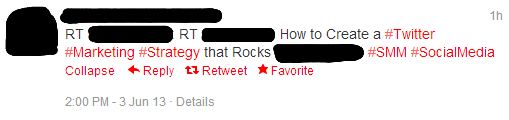
The first example is from your average, run-of-the-mill Twitter user. He or she started with hashtags, asked themselves a question, and then answered said question with more hashtags. More of their 140-character allotment is taken up by linked hashtags than by actual words. And that’s just annoying.
The same is true for brands. In the second example, a business added a hashtag to the front of almost every word in their Tweet. In addition to having two attributed handles (what comes after the RTs), the Tweet also contained a hyperlink. You can see how many more links than actual text there are in this Tweet. And if your business does the same thing, it can be hard to read the message you’re trying to send.
Additionally, you have to consider how many people are really searching for the hashtags used in the examples. The most successful hashtags grab attention and connect users together based on their interests. #absolutely and #strategy probably aren’t the best ways to connect people—they are too general and don’t apply to anything in the Tweets themselves. The opposite is true of #soheresthestoryfromatoz—it’s far too long and far too specific to be of any real value (besides the nostalgia effect). However, #socialmedia and #roadtrip are both great hashtags because they are actual interests around which people routinely wrap their conversations.
A good rule of thumb is to keep your hashtags at a maximum of two per Tweet. You can choose to either link them organically through your message or wait until the end (to see if you still have space after the most important part of your message has been delivered). In general, though, you want to make sure your message can clearly be seen through your attempts to try and connect with others.
Note: All of this is also true for Facebook hashtags as well.
#3: Pinning the Same Thing Multiple Times
Of course you want your content to do well on Pinterest. But pinning and repinning your own content multiple times across multiple pinboards just so it’ll show up in the Pinmarklet again won’t do you any good—if people didn’t find it interesting the first time, they probably won’t find it interesting the next 10 times you share it either.
Instead, focus on ways you can promote a single pin. For instance, did you know that Pinterest uses hashtagging to make content searchable? Utilize this in the way you would on Twitter—discreetly and as appropriate to your content.
Additionally, make sure your content is available to be pinned from its original location. Add a “Pin This” button among your other social buttons so that when someone stumbles across your content and finds it as genius as you do, they can easily share it with their Pinterest buddies.
Always remember: if your content is interesting, useful, and fun, other people WILL find it and share it. You just have to provide them ways to do it!
#4: Spamming Your Content in Google+ and LinkedIn Groups
Google+ Communities and LinkedIn groups are great ways to promote your content and to network with other people in your industry. However, this doesn’t mean that you should join every group that seems relevant to you and then post every link of your blog content to said groups. That’s called spamming.
Most social groups have set rules that govern interactions within the group. This often includes what’s appropriate to post. Always read and respect the rules of any given community you join—the alternative makes you and your brand look unprofessional.
Additionally, leave some room for other people to share their ideas and content. Communities are communicating and sharing with other people—and one of the most fundamental aspects of sharing is to wait your turn.
Your Takeaways
Social media is all about being smart about your brand and your message. But choosing to do any of the aforementioned means you’ve probably switched yourself into autopilot mode and aren’t paying attention to how others are perceiving you and your brand. Instead, make sure you’re paying attention and setting yourself up for success!
That’s why if you want to market the right way on social media, you got to ask the experts from Arcane Instagram.